Undelete deleted files from Windows recycle bin

The computer I’m using is from my sister, when she presented it me, I made cleanup, but now she found that there were some files she forgot to backup into her USB flash drive. My God, it has been one week! Is there anyway to undelete the long lost files?
It's possible to undelete deleted files from the recycle bin, as you may know, but as the time pass by, the chances become lower, because you are keep saving more files after your previous ones were deleted, which could make your deleted files data overwritten by new stored data.
Fortunately this Applexsoft Windows File Recovery makes it possible to undelete your deleted files from Windows recycle-bin.
To undelete deleted files from Windows, please do according to the following steps:
1, First, Download Applexsoft Windows File Recovery. Launch the process on your computer.
2. A wizard offering two options to get back your deleted files prompts. as shown in the picture below.
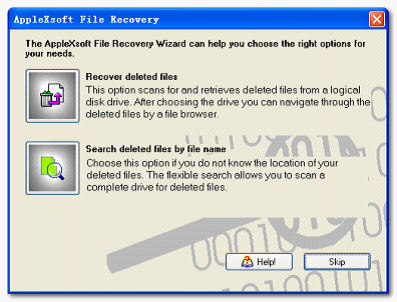
3. Recover deleted files. This option scans and undelete deleted files from a local disk drive, if you skip this wizard, click on the Open Drive on the main interface.
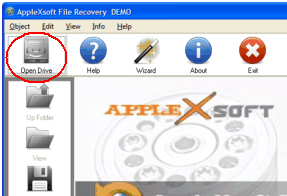
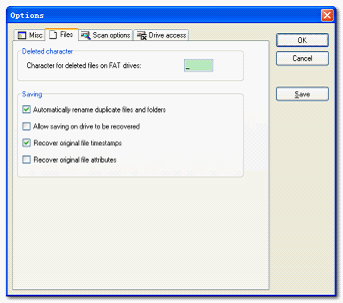
4. The Select drive windows opens. Now you need to narrow the scanning range. Choose your drive that containing the deleted files. On the Scan Options windows, enable the Files tab. Enter the characters included in the deleted files if you can remember. Choose the save options and Click OK.
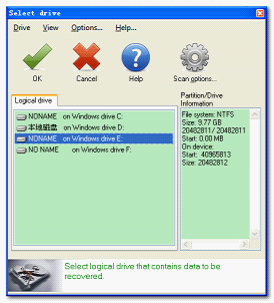
5. Now you should return to the Select drive Windows. Select the drive where the deleted files you want to retrieve were stored. then Click on the OK icon to start the scanning process.
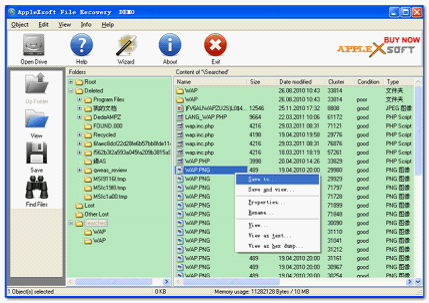
6. After a few seconds, scan results for deleted file recovery will be listed with original name and path. Or you can click on the Find files icon; enter the file name to directly locate the files.
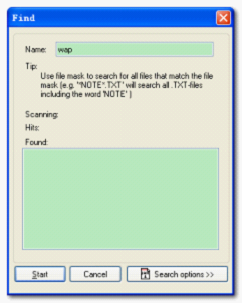
7. Find out the target files that you want to recover. Right click on the file name and set the save destination. Simply save them to another hard disk!
OK, That's it!
Just looking for Deleted File Undelete?
Click the green button below to download a FREE version.

For Windows 10, 8, XP Vista & Windows 7
How to undelete files in various cases