Please follow the quick and easy steps below to begin the data recovery process
Before getting started your success in recovering files depends a great deal on how the disk is handled and the amount of information written to the disk after the deletion occurred:
Note: Do NOT continue work on a hard drive containing lost data.
- Never install software to a system containing deleted files you wish to recover.
- You should not use the system with the deleted files to create documents and folder, surf the Internet, or check mail so on.
- Do NOT reboot or shut down the system.
- The more activity the less of a chance of recovery.
- DO NOT run any other partition repair utility.
- DO NOT defragment your hard drive or execute SCANDISK in a deleted recovery situation. Doing so will likely remove all remnants of the file you are trying to recover.
AppleXsoft Data Recovery was designed to run from the CD-ROM or from a directory on another partition or network drive. It is not recommended that you install the software on the work system; temporary files may be written to the disk. Simply run the software from the AutoRun menu (right click your CD-ROM symbol) or Click the .EXE file in Windows® explorer. Once the desired files are recovered you can install Data Recovery on the system.
NOTE: For using Data Recovery under Windows 10 / 8 / 7 / XP your user account must have administrator privilege.
In four steps you recover your deleted files:
Step 1: Run AppleXsoft Data Recovery Professional
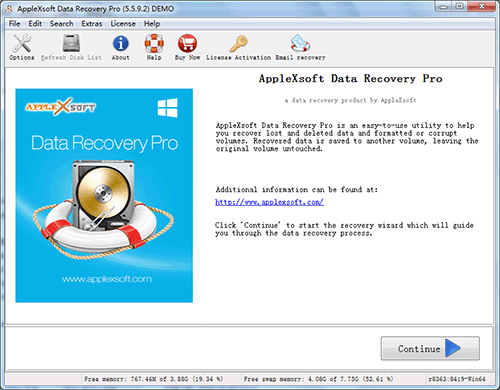

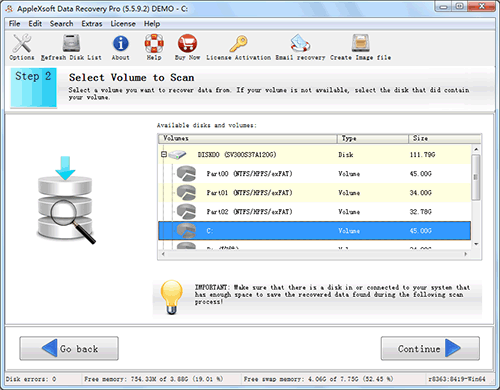
Step 2: Choose your drive
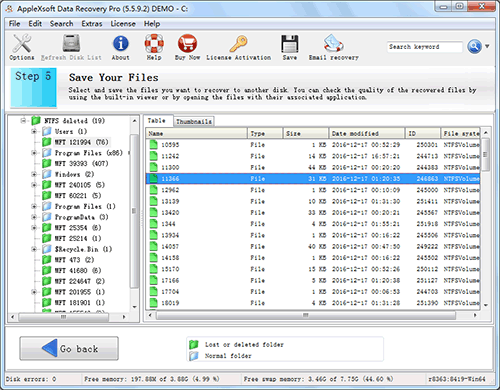
Step 3: Select your deleted files/directories
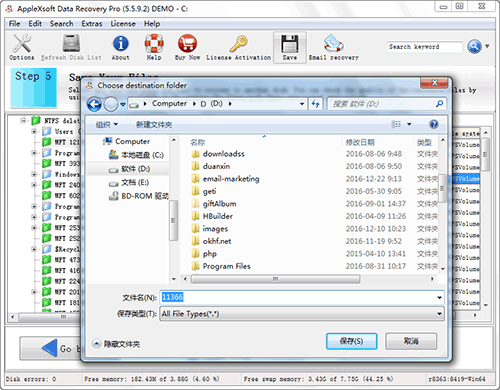
Step 4: Simply save them to another hard disk!
 Allows recovering your data from:
- Deleted, lost or damaged partition.
- list Windows is damaged and system not bootable
- list Lost or deleted volumes and files
- list Accidental or malicious disk initializations
- list Installations Gone Wrong
- list Virus Attacks - Deletions
- list Deletions- local or over network
- list Local HDD or External drives
- list Virtually Any Logical Disk Disaster