Recovers lost, deleted, corrupted and formatted photos from Memory Stick!
Is your camera telling you "card not formatted", "card not found", or similar error message while attempting to read your memory stick? Did you accidentally "format" your memory stick or delete your photos before you moved them to your computer? Don't panic! You've arrived at the right place.
What is Memory Stick?
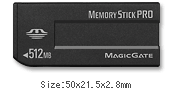
Memory sticks are handy devices that can be used to copy and store data from computer hard drives.
Memory Stick is a removable flash memory card format, Developed by Sony in October 1998. There are several types of memory stick including Memory Stick, Memory Stick Pro, HG, Memory Stick PRO Duo and Memory Stick Micro (M2). Capacities of memory stick are from 16 MB to 64 GB. Memory Stick also can be used in other digital devices e.g. Sopy PSP (Play Station Portable), Camcoder, Phone
and so on.
Memory sticks can become corrupted or damaged in a variety of ways, resulting in error messages like, "card not found", "card not formatted", "no images found", etc. In most cases, the photographs are still on the memory stick and are recoverable.
AppleXsoft
Memory Stick Recovery software is able to help you recover your important photos and video from memory stick on Mac OS X. It is designed to restore files accidentally deleted or lost on digital cameras, MS Suface, mobile phones, PSP and other devicesthat use memory stick. It's the world’s first software to support AVCHD video and RAW image files. just by downloading software and following a few steps.

If you need recover files or photos from Memory Stick on computer installed Windows system, you should download the
Photo Recovery for Windows.
How to recover photos from your memory stick on Mac OS X?
Mac Memory Stick Recovery software provide the simple to use interface makes it easy to recover your photos
from memory stick with just a few mouse clicks! No technical skill is required to recover memory stick on Mac.
Steps to recover photos from memory stick on Mac OS X:
- Download and install 'Mac Memory Stick Recovery software' on your Mac OS X.
- Connect the digital camera to your Mac with the USB cable that came with the camera. If you have a memory card reader, place the memory stick into the card reader and plug it into the computer.
- Double-click the program icon to run Memory Stick Recovery software.
- Select the drive that corresponds to your Memory Stick.
- Choose the file type you want to recover or select the model camera you are using.
- Click the Options button, Select the location on your computer's hard drive where you want the recovered files to be saved.
- Click "Start Scan." The program will automatically restore the photos it finds and save them to the location you specified. This process could take several minutes.
Note:
- A memory card reader is needed if your camera cannot appear as a drive letter in My Computer.
- To preserve the drive with the lost or deleted photos, all recovered files must be saved to another storage device or another drive letter in the system. Do not select your Memory Stick as the destination, as this will destroy the data on the Memory Stick and it will not be recoverable! Choose a separate drive.
- The software performs read-only operation on your memory stick, and saves the recovered pictures to your hard drive. It is safe and easy.
That's all there is to it! Why not download
Memory Stick Recovery now and try it for yourself?