
 Can AppleXsoft File Recovery for Mac recover files from a USB disc?
 Yes, AppleXsoft File Recovery for Mac does support recover files from a USB disc, we have successfully tested the software on FireWire and USB 2.0 Disk Drives.
What is the serial number to activate AppleXsoft File Recovery for Mac?
After your order, you should receive two emails, there is a license code in one of them, that is the serial number, The format is like: APXFR-0550-nnnnn-nnnnn-nnnn , (the letter n is a digital number from 0 to 9).The program freezing when
saving the recovered files, how to fix this?
The most common cause of issues like this is a corrupt or damaged
filesystems entry. To get around this, the customer can either save off
just the raw results(the green Applications/Images/Videos/etc.. folders)
or save just the files/folders they need one by one(without using the
thumbnail view) to try and avoid the file(s)/folder(s) that may be
causing the issue.
I have accidentally formatted my Mac hard drive, having HFS+ volume. Is there any way to recover data?
Yes, file recovery is possible from this HFS+ volume. We get many recovery cases similar to this, as we are the industry experts in Mac OS X platform.
Does Applexsoft File Recovery support the Mac mini, iMac, MacBook Pro (Intel based Macs)?
Yes it will. The Applexsoft File Recovery application is Universal Binary, meaning it will work on both PowerPC and Intel based Macs.
What is the difference between trial & full Version of your Data Recovery Software?
The trial version allows you to preview the recovered files but it limits you to save recovered files. You must purchase Full Version to view the recovered file and save them to the desired location.
The License Manager will start up but there is no activation hyperlink or Request Number displayed. Howo to fix this?
First of all, make sure the user is in a profile that has administrator rights as this program requires admin rights to operate properly. Otherwise, it's either the normal permission issue or they need to go into the ~/Library folder and delete all the “com.applexsoft.filerecovery.pro”and “com.lc-tech.licman” folders and re-launch the program.
What should I do immediately after accidental erasure to ensure that I can recover those files?
The most important thing is to prevent the erased file from being overwritten by another file. To do so, avoid any use of the disk where the file was erased, until after the erased file is recovered. Also, remember that File Recovery should not be installed to this disk. Install it to a floppy disk if no other disk is available.
How do I install the AppleXsoft File Recovery for Mac ?
Please do not launch the program from the DMG file directly. To install the software, please follow the steps below:
Yes, AppleXsoft File Recovery for Mac does support recover files from a USB disc, we have successfully tested the software on FireWire and USB 2.0 Disk Drives.
What is the serial number to activate AppleXsoft File Recovery for Mac?
After your order, you should receive two emails, there is a license code in one of them, that is the serial number, The format is like: APXFR-0550-nnnnn-nnnnn-nnnn , (the letter n is a digital number from 0 to 9).The program freezing when
saving the recovered files, how to fix this?
The most common cause of issues like this is a corrupt or damaged
filesystems entry. To get around this, the customer can either save off
just the raw results(the green Applications/Images/Videos/etc.. folders)
or save just the files/folders they need one by one(without using the
thumbnail view) to try and avoid the file(s)/folder(s) that may be
causing the issue.
I have accidentally formatted my Mac hard drive, having HFS+ volume. Is there any way to recover data?
Yes, file recovery is possible from this HFS+ volume. We get many recovery cases similar to this, as we are the industry experts in Mac OS X platform.
Does Applexsoft File Recovery support the Mac mini, iMac, MacBook Pro (Intel based Macs)?
Yes it will. The Applexsoft File Recovery application is Universal Binary, meaning it will work on both PowerPC and Intel based Macs.
What is the difference between trial & full Version of your Data Recovery Software?
The trial version allows you to preview the recovered files but it limits you to save recovered files. You must purchase Full Version to view the recovered file and save them to the desired location.
The License Manager will start up but there is no activation hyperlink or Request Number displayed. Howo to fix this?
First of all, make sure the user is in a profile that has administrator rights as this program requires admin rights to operate properly. Otherwise, it's either the normal permission issue or they need to go into the ~/Library folder and delete all the “com.applexsoft.filerecovery.pro”and “com.lc-tech.licman” folders and re-launch the program.
What should I do immediately after accidental erasure to ensure that I can recover those files?
The most important thing is to prevent the erased file from being overwritten by another file. To do so, avoid any use of the disk where the file was erased, until after the erased file is recovered. Also, remember that File Recovery should not be installed to this disk. Install it to a floppy disk if no other disk is available.
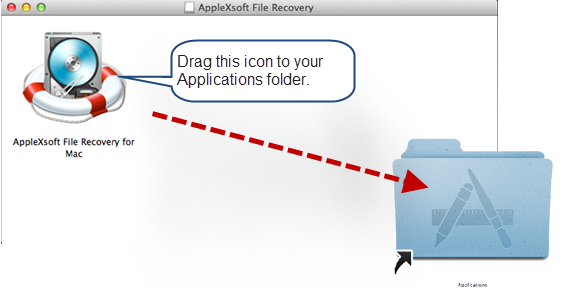
How do I install the AppleXsoft File Recovery for Mac ?
Please do not launch the program from the DMG file directly. To install the software, please follow the steps below:
 Why recovering to the same disk is not recommended?Recover to the same disk may overwrite the very segments of the disk that you're trying to recover files from. That will not leave you another recovery chance.
What operating system can File Recovery support?
AppleXsoft File Recovery supports Mac OS X 10.4 or later.
macOS High Sierra 10.13 compatible.
Why recovering to the same disk is not recommended?Recover to the same disk may overwrite the very segments of the disk that you're trying to recover files from. That will not leave you another recovery chance.
What operating system can File Recovery support?
AppleXsoft File Recovery supports Mac OS X 10.4 or later.
macOS High Sierra 10.13 compatible.

Whether you’re just getting started or want to learn some new video tricks, we’ve got free tutorials for you.

We welcome your feedback, suggestions about our products. If you have any questions related to our products, do feel free to contact us.



